


WA Department Commerce - Staff Only
Citrix Frequently Asked Questions
Quick Answers
This FAQ covers the most common questions about Citrix access, clients, key fobs, and troubleshooting.
What is Citrix XenApp?
Citrix XenApp allows Commerce employees to access remote applications including network drives and internal files.
Does it cost extra?
Yes. Your supervisor must approve Citrix usage. Commerce Customer Services can assist with purchasing and setup. Outlook Web App is available at no additional cost.
Do I need to install software?
Yes — you need the latest Citrix client. Download Latest Client.
How do I use full Outlook remotely?
Visit Citrix and log in with your Citrix account.
How do I get a Citrix RSA key fob?
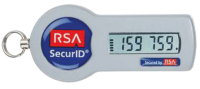
Get supervisor approval and submit a request to Commerce Customer Services. The physical token has a cost associated with it.
What is a Citrix RSA key fob?
I messed up my password 3 times. What now?
Wait 30 minutes for the account to auto-reset. During business hours, Customer Services can unlock it.
I entered the wrong passcode once. What now?
Wait until a new code appears on the key fob before trying again.
I logged in but my apps don't appear.
Uninstall and reinstall the Citrix Client: Download Latest Client.
I'm asked to open or save “citrix.ica”.
Run the cleanup tool: Citrix Receiver Clean-Up Utility (Windows only), then reinstall the Citrix client.
Still need assistance?
Disclaimer
Commerce cannot support personal devices unless provided by the agency. These instructions assist with Citrix access only. Use at your own risk.